こんな感じ(画像クリックで拡大)
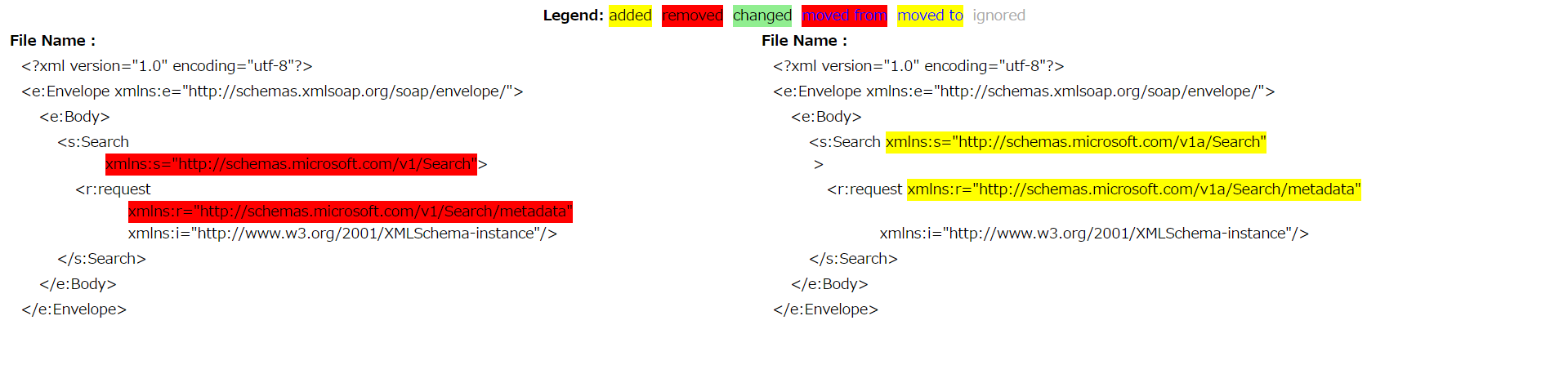
以下、ライブラリの導入
1. 以下のサイトからXML Diff & Patch GUI Toolをダウンロードしてください。
https://www.microsoft.com/en-us/download/details.aspx?displaylang=en&id=24313
2. ダウンロードしたToolをインストールしてください。
3. インストール後にフォルダが開くので、その中に含まれているxmldiffpatch.dllとXmlDiffPatch.View.dllをクラスライブラリとして参照してください。
<デフォルトインストールフォルダ>User\Documents\MSDN\SQLXML Bulkload in .NET Code Sample
<参照方法>visual studio だとプロジェクトの右メニュ<追加>から参照
4.クラスファイルの先頭に<using Microsoft.XmlDiffPatch;>を入れる。
以上がライブラリの導入になります。
次にライブラリの使用方法ですが、実はあまり自分も分かっていない・・・ので
とりあえず、2つのXMLファイルの比較結果をhtmで出力するメソッドを、上記Toolのソースを抜粋&編集して用意しました。
//2つのXMLファイルを比較して比較結果をhtmlで出力するメソッド
//origfile = オリジナルファイルPATH、editFile = 編集ファイルPATH、outputDiffFile = 差分出力htmlファイルPATH
public void DoCompare(string origfile, string editFile, string outputDiffFile)
{
Random r = new Random();
//to randomize the output files and hence allow
//us to generate multiple files for the same pair
//of comparisons.
string startupPath = Application.StartupPath;
//output diff file.
diffFile ="./"+"vxd.out";
XmlTextWriter tw = new XmlTextWriter(new StreamWriter(diffFile));
tw.Formatting = Formatting.Indented;
bool isEqual = false;
//Now compare the two files.
try
{
isEqual = diff.Compare(file1, file2, compareFragments, tw);
}
catch (XmlException xe)
{
MessageBox.Show("An exception occured while comparing\n" + xe.StackTrace);
}
finally
{
tw.Close();
}
if (isEqual)
{
//This means the files were identical for given options.
MessageBox.Show("Files Identical for the given options");
return; //dont need to show the differences.
}
//Files were not equal, so construct XmlDiffView.
XmlDiffView dv = new XmlDiffView();
//Load the original file again and the diff file.
XmlTextReader orig = new XmlTextReader(file1);
XmlTextReader diffGram = new XmlTextReader(diffFile);
dv.Load(orig,
diffGram);
//Wrap the HTML file with necessary html and
//body tags and prepare it before passing it to the GetHtml method.
StreamWriter sw1 = File.CreateText(outputDiffFile);
sw1.Write("<html><body><table width='100%'>");
//Write Legend.
sw1.Write("<tr><td colspan='2' align='center'><b>Legend:</b> <font style='background-color: yellow'" +
" color='black'>added</font> <font style='background-color: red'" +
" color='black'>removed</font> <font style='background-color: " +
"lightgreen' color='black'>changed</font> " +
"<font style='background-color: red' color='blue'>moved from</font>" +
" <font style='background-color: yellow' color='blue'>moved to" +
"</font> <font style='background-color: white' color='#AAAAAA'>" +
"ignored</font></td></tr>");
sw1.Write("<tr><td><b> File Name : ");
sw1.Write(textBox1.Text);
sw1.Write("</b></td><td><b> File Name : ");
sw1.Write(textBox2.Text);
sw1.Write("</b></td></tr>");
//This gets the differences but just has the
//rows and columns of an HTML table
dv.GetHtml(sw1);
//Finish wrapping up the generated HTML and complete the file.
sw1.Write("</table></body></html>");
//HouseKeeping...close everything we dont want to lock.
sw1.Close();
dv = null;
orig.Close();
diffGram.Close();
//File.Delete(diffFile);
//Done!
}
使い方は簡単、以下のとおりメソッドを呼ぶだけ
            String origfile = @"C:\Users\use\Documents\sampleXml\testNameSpace2.xml"; //オリジナルファイルPATH
            String editFile = @"C:\Users\use\Documents\sampleXml\testNameSpace2-1.xml";//編集ファイルPATH
            String outputDiffFile = @"C:\Users\user\Desktop\test\" + "Test" + ".htm";  //差分出力htmlファイルPATH
            //outputDiffFile で指定したディレクトリに差分比較のhtmlができる。
            DoCompare(origfile, editFile, outputDiffFile);

0 件のコメント:
コメントを投稿